Sunday, 19 January 2014

How to move Windows Live mail emails to PST files in swift manner

Windows Live Mail & Windows mail stores incoming and outgoing emails of the user mailbox in EML file format. EML files contain plain or unformatted messages of users. Though EML file is primarily associated with the Windows Live mail account, several other email clients such as Outlook 2010, Outlook Express, Mozilla Thunderbird, Eudora and Outlook 2011 for Mac also supports EML file format for email storage.

Outlook Express is inbuilt email client of Microsoft Windows and integrated with Internet Explorer. It stores emails, attachments and other mailbox information of a user in DBX files. Outlook Express can also open EML files of Windows Live mail or other email clients.

Microsoft Outlook is an email client of Microsoft Office service pack. MS Outlook saves emails, contacts and other data of its users in PST file format. Outlook 2007 and higher versions allow users to open or read plain text messages saved in EML files.

Mozilla Thunderbird is an open source email program of Mozilla corporation. It saves mailbox data of users in MBX file format and available for Windows, Mac and Linux operating systems. Mozilla Thunderbirds can open emails and email metadata of Windows Live mail or Windows mail accounts. EML file has several limitations as mentioned below:

  • An individual EML file can store only one text message of an email account
  • EML file only holds plain and unformatted text messages of the Windows Live mail or Windows mail account
  • EML file does not support formatted emails and contacts

Due to limitations of EML file, many users prefer migrating into other email platforms such as MS Outlook from Windows Live mail. You can move your Windows Live mail emails to Outlook or MS Exchange using following steps:

1.Start Windows Live mail
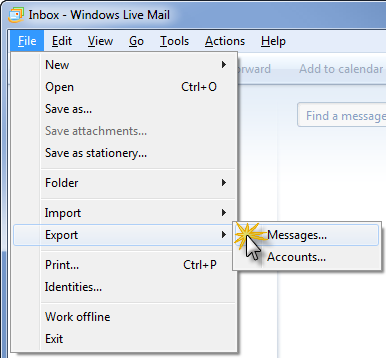
2.In the mailbox Windows, click “File” option
3.Right click “Export” button followed by “Email messages”
4.Select “Microsoft Exchange” and press “Next”

A message will be displayed asking you to export all emails to MS Outlook or Exchange

5.Press “ok” if you want to export all Windows live mail emails to MS Outlook
6.Press “Finish” button when export of emails is completed

You can also move your Windows Live mail account to MS Outlook directly using Import-Export Wizard of Outlook 2010:

1.Start Outlook 2010 program
2.Click on “File” menu and select “Open” option
3.Right click on “Import” wizard
4.In the import Wizard, select “Import from another program or file” and press “Next”
5.Select “Outlook Express 4.x, 5.x, 6.x or Windows mail” and press “Next”
6.This will import your Outlook Express or Windows Live mail files into Outlook

But manual EML to PST migration is not a feasible process especially when you intend to move a large Windows Live mail account or several EML files to MS Outlook. Therefore, it is always better to use an automatic EML to PST conversion tool for moving several EML files to Outlook PST.

Kernel for EML to PST moves EML/EMLX file items to Microsoft Outlook. It converts EML/EMLX files of a computer drive to PST format using different filter options such as To, From, Date and Subject. EML to PST converter adds converted EML/EMLX file items to a new or already existing PST file.

To know more visit:- http://www.export.emltopstconversion.org/

Tuesday, 30 July 2013

How to convert Windows Live mail to Microsoft Outlook PST file


Typically, MS Outlook is the most appreciated email client worldwide among personal or professional users. It allows users to send or receive emails, manage notes, calendar entries, contacts and many other things. It is easy to use and widely available; hence, people tend to use it more than any other email client in the market. However, there are a huge number of users who access their emails through Windows Live Mail, Windows Mail, Mozilla Thunderbird and Apple email clients. 

Windows Live mail and above mentioned email clients have EML or EMLX mail format that is entirely different from MS Outlook’s PST. In order to access EML/EMLX format mails in Outlook, one must learn to export all emails easily. Here are some steps that must help in performing Windows Live Mail to Microsoft Outlook. 


Open the Microsoft Outlook and Windows Live mail clients. Obviously, you cannot perform migration without these clients. Select the Microsoft Exchange as the format and click Next to proceed. After the click, a message is displayed that says,


“All emails will be exported to Microsoft Outlook or Microsoft Exchange”

In order to continue with the process, click OK and wait. The software allows you to select folders for the conversion; you can choose some or all. After selecting folders, click OK. When the process completes, a popup comes and click Finish. When exporting Windows Live mail or Outlook Express mail to Outlook 2013, you must own Outlook 2013 32 bit. The whole conversion process takes time depending on the number of files needed for conversion.


It is the easiest inbuilt way to perform EML to  PST Converter. However, it might take more time and not be feasible for all. Moreover, it does not assure of complete migration instantly. In order to perform quick and efficient Windows Live Mail into Microsoft Outlook, try third party Kernel for EML to PST Conversion Software. The software promises complete or selective EML files conversion in minutes and assures of complete accuracy. 

Kernel for EML to PST Conversion Software assures easy email migration. The software requires no technical knowledge and is simple to use. Users can perform conversion and choose to save only selective files based on various criteria such as to, From, Date, subject. The software is also available in free trial edition that allows you to try the tool before purchase :  http://www.windowslivemailtopst.emltopstconversion.org/

Monday, 22 April 2013

How to Manually Convert Windows Mail (EML) to Outlook PST


MS Outlook is a Microsoft product that helps users in managing huge volume of emails, journals, notes, calendar entries, contacts or notes with ease. It allows all email clients to be managed with few clicks and simplicity. Users find it simple to use and install. It can quickly search the required file, edit it, complete send or receive functions and perform various other functions with least effort. Smart themes, graphics and many more things make it the most loved email client worldwide among personal and professional users.


MS Outlook uses PST file format for emails. The trouble comes in when MS Outlook users have to access Windows Live mail, Outlook Express, Mozilla Thunderbird or Apple mail clients’ emails. It is not easy to perform Windows Live Mail to Outlook conversion. Here are few ways to do so.
Manual Method
  1. Launch MS Outlook on the computer and Click the ‘File’ option. Select Open and click on Import. Click on Import from another Program or file.
  2. Select Next
  3. Select the file format as Comma Separated values
  4. Click Next
  5. Locate the imported file using navigation commands
  6. Double click. Select Replace Duplicates with items imported, ‘Allow duplicates to be created’ or ‘Do not import duplicate items’ according to the need of hour and then click ‘Next’
  7. Choose the folder to save imported files
  8. Click Next
  9. Complete the process by clicking Finish

This process requires some technical skills and there is no guarantee if you will be able to convert EML to PST files format. Another way to perform entire email migration is to use third party Kernel for EML to PST Conversion Software. Other than being easy to use, interactive the tool is supported by all versions of MS Outlook and effortlessly performs migration. The software allows user to select converted folders to be saved at preferred location. The software can be used by native computer users as well.

Just make sure Microsoft Outlook is already installed on the system to perform the conversion. Using third party software ensures quick and accurate conversion. Moreover, the Kernel for EML to PST Conversion software is available in free trial edition. For more information please visit: http://www.free.emltopstconversion.org/